长时间运行 Agent 的高效框架设计
原文发布于 2025 年 11 月 26 日,作者 Justin Young
代码示例见 quickstart 仓库
长时间运行的 Agent 面临什么问题?
当 Agent 需要跨多个上下文窗口完成复杂项目时,单靠上下文压缩无法解决深层的协调问题。 Claude Agent SDK 内置了上下文管理能力(如压缩),使 Agent 不会耗尽上下文窗口。但在跨越多个会话的复杂项目中,仅靠压缩远远不够。
在使用 Opus 4.5 等前沿模型的测试中,我们反复观察到两种失败模式:
| 失败模式 | 具体表现 |
|---|---|
| 一次做太多 | Agent 试图一次性搞定整个应用,实现到一半上下文就耗尽了,留给下一个会话的是半成品和零文档 |
| 过早宣布完成 | 在部分功能实现后,新启动的 Agent 看到已有进展,就直接"宣布任务完成" |
解决方案由两部分组成:
- 初始化 Agent: 使用专门的 prompt 搭建环境——创建
init.sh脚本、claude-progress.txt进度文件,并完成初始 git 提交。 - 编码 Agent: 后续每个会话只做增量推进,并留下结构化的进度更新。
核心洞察:Agent 需要"在以全新上下文窗口启动时,能迅速理解当前工作状态"——这通过进度文件和 git 历史来实现。
环境管理
通过区分首次运行和后续运行的 prompt,让 Agent 在不同阶段采取截然不同的策略。 参考 Claude 4 prompting 指南,我们为第一个上下文窗口使用了不同于后续会话的 prompt。
功能列表
为防止"一次做太多"或"过早完成",初始化 Agent 会生成一份全面的功能需求文件。 以一个 claude.ai 克隆项目为例,这意味着超过 200 个功能点,初始状态全部标记为"失败"。
功能定义示例:
{
    "category": "functional",
    "description": "New chat button creates a fresh conversation",
    "steps": [
      "Navigate to main interface",
      "Click the 'New Chat' button",
      "Verify a new conversation is created",
      "Check that chat area shows welcome state",
      "Verify conversation appears in sidebar"
    ],
    "passes": false
}
编码 Agent 被要求只修改 passes 字段,不得删除或修改测试本身。prompt 中使用了强硬措辞:"It is unacceptable to remove or edit tests because this could lead to missing or buggy functionality." 选择 JSON 格式的原因是模型对 JSON 的不当篡改率远低于 Markdown。
增量式推进
编码 Agent 每次只处理一个功能——这是防止"做太多"倾向的关键约束。 Agent 完成后将进展提交到 git(附描述性 commit message),并在进度文件中写入摘要。这让我们能利用 git 回退错误修改、恢复可用状态。
测试验证
一个主要失败模式是 Agent 不做端到端验证就标记功能完成。 当我们明确要求 Agent 使用浏览器自动化工具(如 Puppeteer MCP 服务器)时,Claude 在验证功能方面表现出色——能像真实用户一样检验功能。
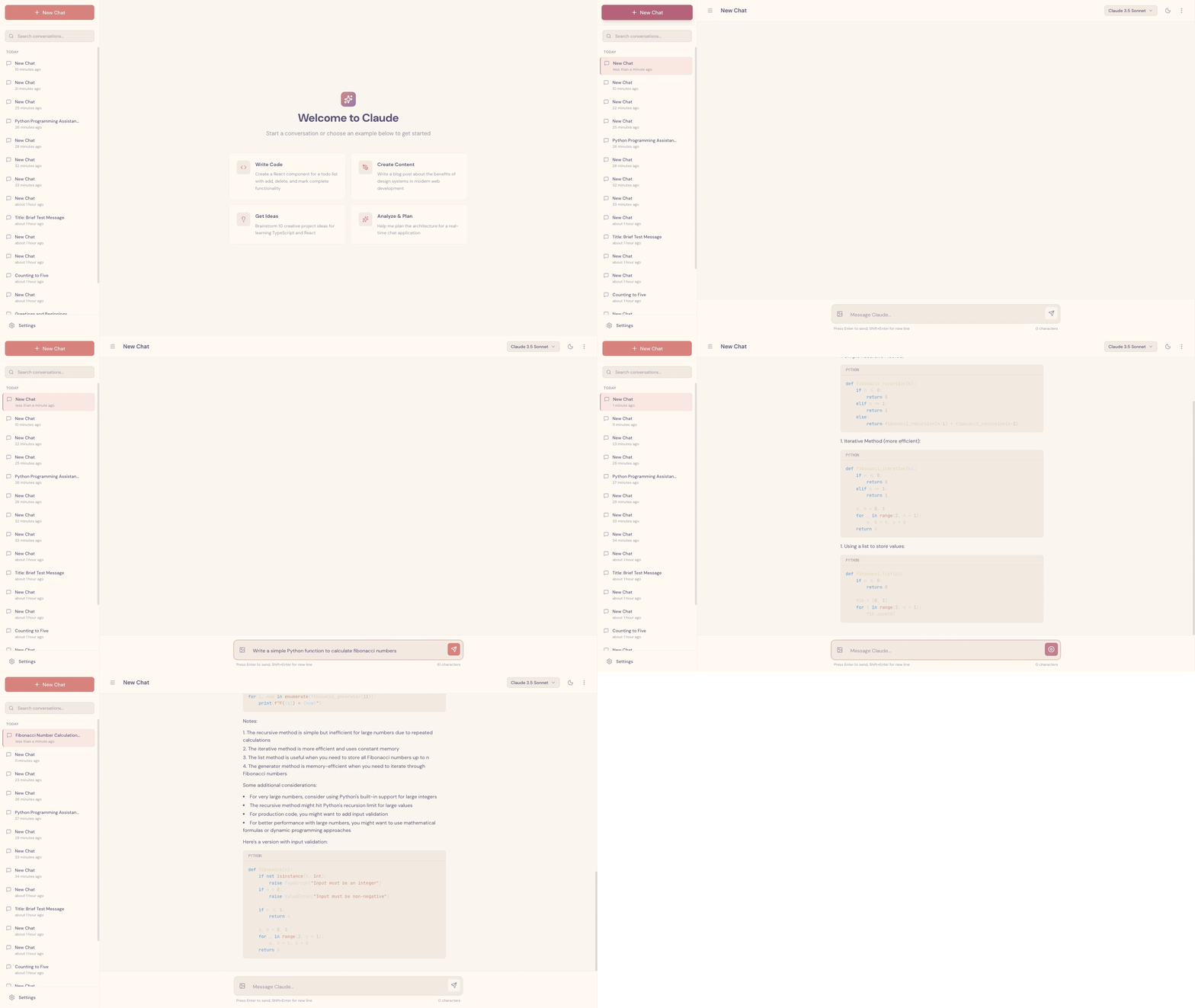
Claude 通过 Puppeteer MCP 服务器测试 claude.ai 克隆时的截图
提供测试工具"极大提升了性能,Agent 能够发现和修复仅靠阅读代码无法察觉的 bug。" 当然仍存在局限性——例如 Claude 无法通过 Puppeteer MCP 看到浏览器原生的 alert 弹窗。
快速进入工作状态
每个编码 Agent 启动时都会执行一套标准化的定位流程,确保迅速理解项目现状。 具体步骤:
- 运行
pwd查看工作目录 - 读取 git 日志和进度文件,了解最近的工作内容
- 读取功能列表文件,选择优先级最高的未完成功能
初始化 Agent 会编写 init.sh 脚本来启动开发服务器,后续 Agent 在实现新功能前先跑一遍基本的端到端测试。
典型的会话启动过程:
[Assistant] I'll start by getting my bearings and understanding the current state of the project.
[Tool Use] <bash - pwd>
[Tool Use] <read - claude-progress.txt>
[Tool Use] <read - feature_list.json>
[Assistant] Let me check the git log to see recent work.
[Tool Use] <bash - git log --oneline -20>
[Assistant] Now let me check if there's an init.sh script to restart the servers.
<Starts the development server>
[Assistant] Excellent! Now let me navigate to the application and verify that some fundamental features are still working.
<Tests basic functionality>
[Assistant] Based on my verification testing, I can see that the fundamental functionality is working well. The core chat features, theme switching, conversation loading, and error handling are all functioning correctly. Now let me review the tests.json file more comprehensively to understand what needs to be implemented next.
<Starts work on a new feature>
失败模式与解决方案
针对每种失败模式,初始化 Agent 和编码 Agent 各有明确的应对职责。
| 问题 | 初始化 Agent 的应对 | 编码 Agent 的应对 |
|---|---|---|
| Agent 过早宣布任务完成 | 基于输入规格建立结构化的 JSON 功能列表 | 启动时读取功能列表,每次只选一个功能推进 |
| Agent 留下 bug 或未记录的进度 | 创建初始 git 仓库和进度文件 | 启动时读取进度文件和 git 日志;在开发服务器上跑基本测试;结束时提交 git 并更新进度 |
| Agent 未经验证就标记功能完成 | 建立功能列表文件 | 自行验证所有功能;只有经过仔细测试后才标记为 "passing" |
| Agent 花时间摸索如何运行应用 | 编写 init.sh 脚本 |
启动时读取 init.sh |
未来方向
仍有待探索的开放问题包括多 Agent 架构的适用性以及向其他领域的泛化。
- 单一通用编码 Agent 是否是最优选择?还是多 Agent 架构(测试 Agent、QA Agent、代码清理 Agent)能在特定子任务上表现更好?
- 这些发现能否从全栈 Web 开发泛化到科学研究、金融建模等其他领域?
致谢
本文由 Justin Young 撰写。特别感谢 David Hershey、Prithvi Rajasakeran、Jeremy Hadfield、Naia Bouscal、Michael Tingley、Jesse Mu、Jake Eaton、Marius Buleandara、Maggie Vo、Pedram Navid、Nadine Yasser 和 Alex Notov。
注:初始化 Agent 和编码 Agent 仅在初始 user prompt 上有所不同——system prompt、工具和整体框架完全相同。