Desktop Extensions:一键安装 MCP 服务器
原文发布于 2025 年 6 月 26 日
更新(2025 年 9 月 11 日): Claude Desktop Extensions 现已采用
.mcpb(MCP Bundle)文件扩展名,取代原来的.dxt。已有的.dxt扩展仍可正常使用,但新扩展建议使用.mcpb格式。所有功能保持不变。
引言
Desktop Extensions 让安装 MCP 服务器变得像点击按钮一样简单。 本文分享了技术架构以及构建优秀扩展的实践经验。
Model Context Protocol(MCP)发布后,开发者迅速构建了各种本地服务器,让 Claude 能够访问文件系统、数据库等资源。然而,"安装过程太复杂了"——用户需要安装开发工具,手动编辑配置文件,还经常遇到依赖冲突。
MCP 安装难题
本地 MCP 服务器能力强大,但安装门槛过高,导致非技术用户难以使用。 本地 MCP 服务器为 Claude Desktop 用户解锁了强大功能——与本地应用交互、访问私有数据、集成开发工具,同时数据保留在用户自己的设备上。但存在诸多障碍:
| 痛点 | 说明 |
|---|---|
| 需要开发工具 | 用户需要安装 Node.js、Python 或其他运行时 |
| 手动配置 | 每个服务器都需要编辑 JSON 配置文件 |
| 依赖管理 | 需要处理包冲突和版本不匹配 |
| 无发现机制 | 找到有用的 MCP 服务器需要到 GitHub 搜索 |
| 更新困难 | 保持服务器最新需要手动重新安装 |
这些摩擦使得 MCP 服务器"对非技术用户来说基本不可触达"。
Desktop Extensions 方案
将完整的 MCP 服务器(含所有依赖)打包成一个可安装文件,实现双击即用。 Desktop Extensions(.mcpb 文件)将整个 MCP 服务器——包括所有依赖——捆绑成一个单一的可安装包。
安装方式对比:
| 传统方式 | Desktop Extensions | |
|---|---|---|
| 步骤 1 | 安装 Node.js | 下载 .mcpb 文件 |
| 步骤 2 | npm install -g @example/mcp-server |
双击打开 |
| 步骤 3 | 手动编辑 ~/.claude/claude_desktop_config.json |
点击"安装" |
| 步骤 4 | 重启 Claude Desktop | 完成 |
| 步骤 5 | 祈祷它能正常工作 | — |
无需终端、无需配置文件、无需解决依赖冲突。
架构概览
Desktop Extension 本质上是一个 ZIP 包,内含本地 MCP 服务器和描述元数据的 manifest.json。 Claude Desktop 和其他应用通过这个 manifest 了解扩展的一切信息。
extension.mcpb (ZIP archive)
├── manifest.json         # Extension metadata and configuration
├── server/               # MCP server implementation
│   └── [server files]
├── dependencies/         # All required packages/libraries
└── icon.png             # Optional: Extension icon

# Example: Node.js Extension
extension.mcpb
├── manifest.json         # Required: Extension metadata and configuration
├── server/               # Server files
│   └── index.js          # Main entry point
├── node_modules/         # Bundled dependencies
├── package.json          # Optional: NPM package definition
└── icon.png              # Optional: Extension icon

# Example: Python Extension
extension.mcpb (ZIP file)
├── manifest.json         # Required: Extension metadata and configuration
├── server/               # Server files
│   ├── main.py           # Main entry point
│   └── utils.py          # Additional modules
├── lib/                  # Bundled Python packages
├── requirements.txt      # Optional: Python dependencies list
└── icon.png              # Optional: Extension icon
唯一必须的文件是 manifest.json。Claude Desktop 处理所有复杂性:
| 特性 | 说明 |
|---|---|
| 内置运行时 | Node.js 随 Claude Desktop 一起分发,无需外部依赖 |
| 自动更新 | 新版本可用时自动更新 |
| 安全密钥存储 | API Key 等敏感配置存储在操作系统的密钥链中 |
最小化 Manifest 示例
{
  "mcpb_version": "0.1",
  "name": "my-extension",
  "version": "1.0.0",
  "description": "A simple MCP extension",
  "author": {
    "name": "Extension Author"
  },
  "server": {
    "type": "node",
    "entry_point": "server/index.js",
    "mcp_config": {
      "command": "node",
      "args": [
        "${__dirname}/server/index.js"
      ]
    }
  }
}
Manifest 规范提供了安装和配置的便捷选项。服务器配置支持通过模板字面量(template literals)进行用户自定义配置,以及平台特定的覆盖设置。
带用户配置(API Key)的 Manifest
{
  "mcpb_version": "0.1",
  "name": "my-extension",
  "version": "1.0.0",
  "description": "A simple MCP extension",
  "author": {
    "name": "Extension Author"
  },
  "server": {
    "type": "node",
    "entry_point": "server/index.js",
    "mcp_config": {
      "command": "node",
      "args": ["${__dirname}/server/index.js"],
      "env": {
        "API_KEY": "${user_config.api_key}"
      }
    }
  },
  "user_config": {
    "api_key": {
      "type": "string",
      "title": "API Key",
      "description": "Your API key for authentication",
      "sensitive": true,
      "required": true
    }
  }
}
在用户提供所有必填值之前,Claude 不会启用扩展。 敏感值保存在操作系统的密钥库中,在启动服务器时通过 ${user_config.api_key} 透明替换。
完整 Manifest 示例
{
  "mcpb_version": "0.1",
  "name": "My MCP Extension",
  "display_name": "My Awesome MCP Extension",
  "version": "1.0.0",
  "description": "A brief description of what this extension does",
  "long_description": "A detailed description that can include multiple paragraphs explaining the extension's functionality, use cases, and features. It supports basic markdown.",
  "author": {
    "name": "Your Name",
    "email": "[email protected]",
    "url": "https://your-website.com"
  },
  "repository": {
    "type": "git",
    "url": "https://github.com/your-username/my-mcp-extension"
  },
  "homepage": "https://example.com/my-extension",
  "documentation": "https://docs.example.com/my-extension",
  "support": "https://github.com/your-username/my-extension/issues",
  "icon": "icon.png",
  "screenshots": [
    "assets/screenshots/screenshot1.png",
    "assets/screenshots/screenshot2.png"
  ],
  "server": {
    "type": "node",
    "entry_point": "server/index.js",
    "mcp_config": {
      "command": "node",
      "args": ["${__dirname}/server/index.js"],
      "env": {
        "ALLOWED_DIRECTORIES": "${user_config.allowed_directories}"
      }
    }
  },
  "tools": [
    {
      "name": "search_files",
      "description": "Search for files in a directory"
    }
  ],
  "prompts": [
    {
      "name": "poetry",
      "description": "Have the LLM write poetry",
      "arguments": ["topic"],
      "text": "Write a creative poem about the following topic: ${arguments.topic}"
    }
  ],
  "tools_generated": true,
  "keywords": ["api", "automation", "productivity"],
  "license": "MIT",
  "compatibility": {
    "claude_desktop": ">=1.0.0",
    "platforms": ["darwin", "win32", "linux"],
    "runtimes": {
      "node": ">=16.0.0"
    }
  },
  "user_config": {
    "allowed_directories": {
      "type": "directory",
      "title": "Allowed Directories",
      "description": "Directories the server can access",
      "multiple": true,
      "required": true,
      "default": ["${HOME}/Desktop"]
    },
    "api_key": {
      "type": "string",
      "title": "API Key",
      "description": "Your API key for authentication",
      "sensitive": true,
      "required": false
    },
    "max_file_size": {
      "type": "number",
      "title": "Maximum File Size (MB)",
      "description": "Maximum file size to process",
      "default": 10,
      "min": 1,
      "max": 100
    }
  }
}
更多示例和完整规范请参阅 MCPB 仓库示例 和 开源工具链 manifest 规范。
构建你的第一个扩展
第一步:创建 Manifest
npx @anthropic-ai/mcpb init
这个交互式工具会询问你的服务器信息,并生成完整的 manifest.json。 使用 --yes 可快速生成最基础的 manifest。
第二步:处理用户配置
"user_config": {
  "allowed_directories": {
    "type": "directory",
    "title": "Allowed Directories",
    "description": "Directories the server can access",
    "multiple": true,
    "required": true,
    "default": ["${HOME}/Documents"]
  }
}
Claude Desktop 会自动完成以下工作:
| 功能 | 说明 |
|---|---|
| 友好的配置界面 | 展示用户友好的配置 UI |
| 输入验证 | 在启用扩展前验证输入 |
| 安全存储 | 安全存储敏感值 |
| 参数传递 | 将配置作为参数或环境变量传递给服务器 |
通过环境变量传递用户配置的示例:
"server": {
   "type": "node",
   "entry_point": "server/index.js",
   "mcp_config": {
   "command": "node",
   "args": ["${__dirname}/server/index.js"],
   "env": {
      "ALLOWED_DIRECTORIES": "${user_config.allowed_directories}"
   }
   }
}
第三步:打包扩展
npx @anthropic-ai/mcpb pack
此命令会验证 manifest 并生成 .mcpb 包文件。
第四步:本地测试
将 .mcpb 文件拖拽到 Claude Desktop 的设置窗口即可测试。 你将看到:
- 人类可读的扩展信息
- 所需的权限和配置项
- 一个简洁的"安装"按钮
高级特性
跨平台支持
通过 platforms 字段为不同操作系统提供特定配置。
"server": {
  "type": "node",
  "entry_point": "server/index.js",
  "mcp_config": {
    "command": "node",
    "args": ["${__dirname}/server/index.js"],
    "platforms": {
      "win32": {
        "command": "node.exe",
        "env": {
          "TEMP_DIR": "${TEMP}"
        }
      },
      "darwin": {
        "env": {
          "TEMP_DIR": "${TMPDIR}"
        }
      }
    }
  }
}
动态配置
模板字面量用于注入运行时值:
| 模板变量 | 用途 |
|---|---|
${__dirname} |
扩展的安装目录 |
${user_config.key} |
用户提供的配置值 |
${HOME}, ${TEMP} |
系统环境变量 |
功能声明
在 manifest 中声明扩展提供的工具和 prompt,方便用户了解扩展能力。
"tools": [
  {
    "name": "read_file",
    "description": "Read contents of a file"
  }
],
"prompts": [
  {
    "name": "code_review",
    "description": "Review code for best practices",
    "arguments": ["file_path"]
  }
]
扩展目录
Claude Desktop 内置了一个扩展目录,用户可以直接浏览、搜索和一键安装。
提交你的扩展到目录:
- 确保扩展遵循提交表单中的指南
- 在 Windows 和 macOS 上完成测试
- 提交你的扩展
- 团队将对质量和安全性进行审核
构建开放生态
Anthropic 致力于围绕 MCP 服务器构建开放生态,开源完整规范和工具链。 Anthropic 相信跨多个应用的普遍采用对社区更有利。开源内容包括:
- 完整的 MCPB 规范
- 打包和验证工具
- 参考实现代码
- TypeScript 类型和 schema
这意味着:
| 角色 | 收益 |
|---|---|
| MCP 服务器开发者 | 一次打包,任何支持 MCPB 的应用都能运行 |
| 应用开发者 | 无需从零构建即可添加扩展支持 |
| 用户 | 在所有 MCP 应用中获得一致的体验 |
规范版本号为 0.1,后续将结合社区反馈持续演进。
安全与企业考量
面向用户
| 特性 | 说明 |
|---|---|
| 密钥链存储 | 敏感数据保存在操作系统密钥链中 |
| 自动更新 | 扩展自动保持最新 |
| 审计能力 | 可审计已安装的扩展 |
面向企业
| 特性 | 说明 |
|---|---|
| 策略管理 | 支持 Group Policy(Windows)和 MDM(macOS) |
| 预装扩展 | 可预装已审批的扩展 |
| 黑名单 | 可屏蔽特定扩展或发布者 |
| 禁用目录 | 可完全禁用扩展目录 |
| 私有目录 | 可部署企业私有扩展目录 |
更多信息请参阅 相关文档。
快速开始
面向 MCP 服务器开发者: 查阅 开发者文档 或运行:
npm install -g @anthropic-ai/mcpb
mcpb init
mcpb pack
面向 Claude Desktop 用户: 更新到最新版本,在设置中查找"Extensions"区域。
面向企业: 查阅企业文档了解部署选项。
用 Claude Code 来构建扩展
Anthropic 发现 Claude 非常擅长以最少的人工干预构建扩展。 以下是推荐的 Claude Code prompt 上下文:
I want to build this as a Desktop Extension, abbreviated as "MCPB". Please follow these steps:

1. **Read the specifications thoroughly:**
   - https://github.com/anthropics/mcpb/blob/main/README.md - MCPB architecture overview, capabilities, and integration patterns
   - https://github.com/anthropics/mcpb/blob/main/MANIFEST.md - Complete extension manifest structure and field definitions
   - https://github.com/anthropics/mcpb/tree/main/examples - Reference implementations including a "Hello World" example

2. **Create a proper extension structure:**
   - Generate a valid manifest.json following the MANIFEST.md spec
   - Implement an MCP server using @modelcontextprotocol/sdk with proper tool definitions
   - Include proper error handling and timeout management

3. **Follow best development practices:**
   - Implement proper MCP protocol communication via stdio transport
   - Structure tools with clear schemas, validation, and consistent JSON responses
   - Make use of the fact that this extension will be running locally
   - Add appropriate logging and debugging capabilities
   - Include proper documentation and setup instructions

4. **Test considerations:**
   - Validate that all tool calls return properly structured responses
   - Verify manifest loads correctly and host integration works

Generate complete, production-ready code that can be immediately tested. Focus on defensive programming, clear error messages, and following the exact
MCPB specifications to ensure compatibility with the ecosystem.
结语
Desktop Extensions 从根本上改变了用户与本地 AI 工具的交互方式。 通过消除安装摩擦,强大的 MCP 服务器不再只是开发者的专属,而是变得人人可用。
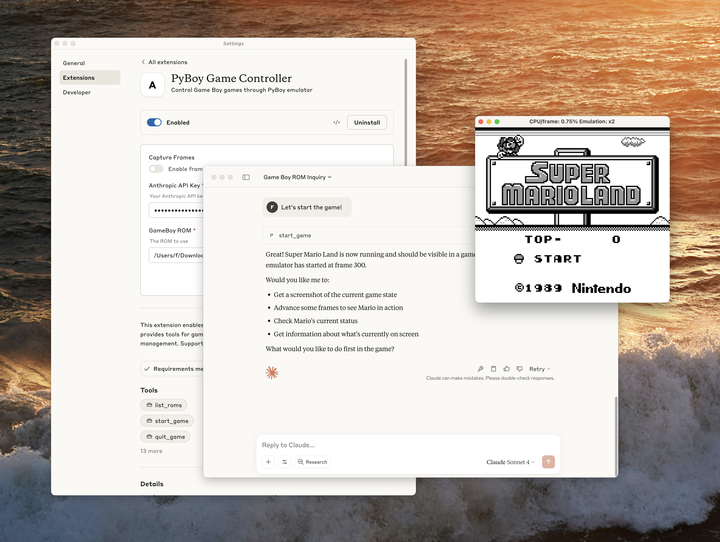
在 Anthropic 内部,团队使用 Desktop Extensions 来共享实验性的 MCP 服务器。有一个团队尝试探索模型连接到 GameBoy 后能走多远——类似于他们 "Claude 玩宝可梦" 的研究。他们使用 PyBoy GameBoy 模拟器打包了一个扩展,让 Claude 可以操控游戏。
"我们迫不及待想看到你会构建什么。" 准备好分享你的 MCP 服务器了吗?提交你的扩展进行审核。